
FMCG
01Fast-moving consumer goods. Daily orders across general trade, kirana stores, and modern retail.
See how it works →Order Booker is field sales software for distribution teams. Reps book orders, send quotations, and collect payments on Android, even offline. Managers track the team, credit, and collections from a web dashboard.
No credit card required. 14-day trial is free.
No credit card required. 14-day trial is free.
You don't know if your sales reps are visiting shops, booking orders, or sitting idle. Manual call-ins don't scale.
Paper-based or WhatsApp orders lead to mistakes, missed items, and no tracking once the rep leaves the shop.
You only see yesterday's numbers, not what's happening right now on the ground.
Order Booker is for distribution teams that visit shops, dealers, and outlets. The order is booked on the spot, and the office sees it the same day.
Fast-moving consumer goods. Daily orders across general trade, kirana stores, and modern retail.
See how it works →Pharmacy, stockist, and distributor calls, with credit limits and a record of every visit.
See how it works →Restaurant, store, and distributor orders, booked at the outlet.
Beauty, hygiene, and household lines, from the shop call back to the office.
Dealer and site orders, with the catalog and pay-back terms on the visit.
See how it works →Counter and dealer bookings for fittings, cables, and appliances.
Workshop and retailer orders, taken on the route that day.
See how it works →School, office, and retail orders, without paper lists.
Van and wholesale rounds, with the order visible in the office the same day.
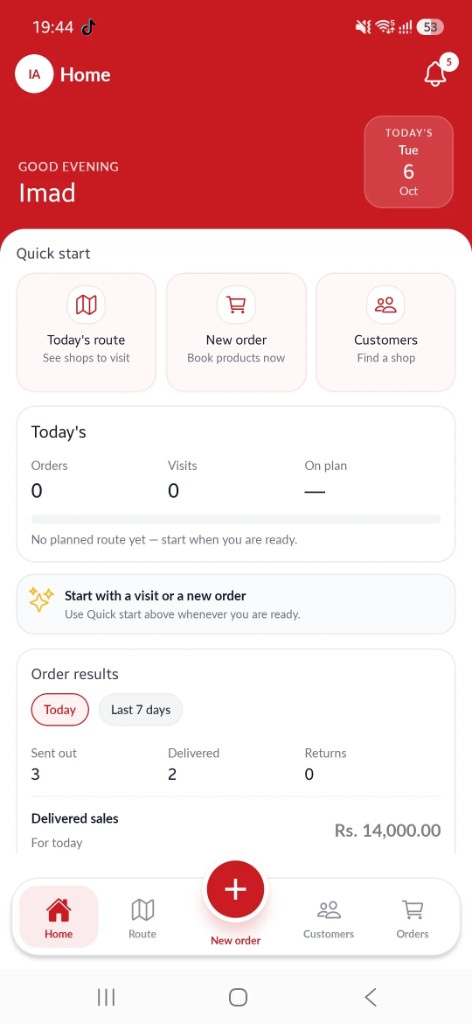
The Order Booker mobile app is built for daily field use: fast, intuitive, and designed to work even when connectivity is poor.
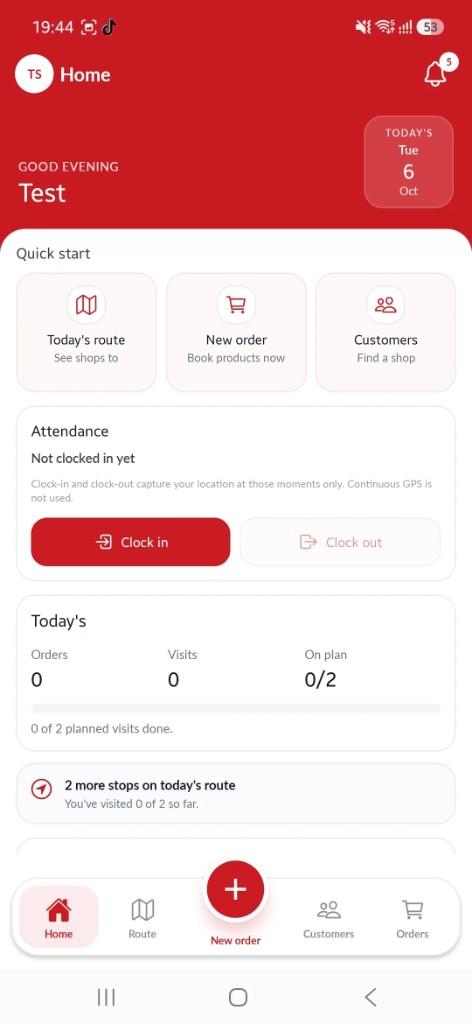
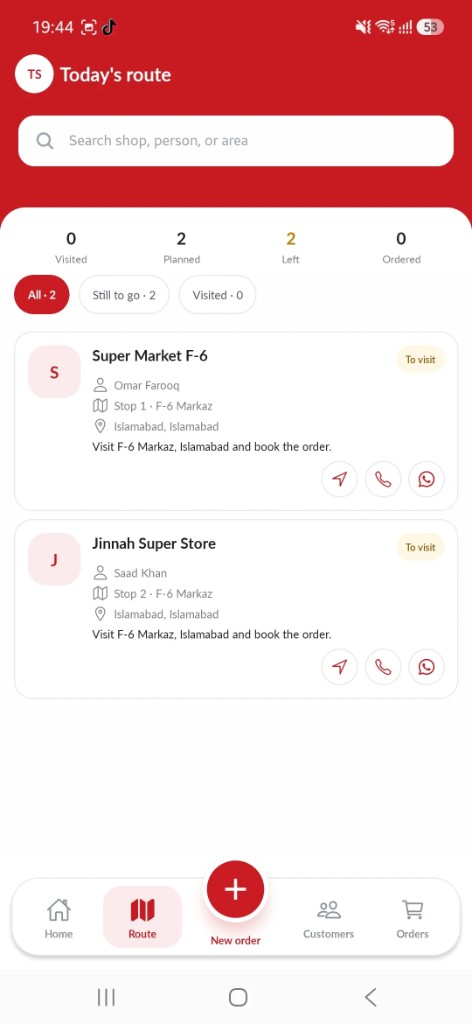
All assigned shops for the day in a clear list. Check in and check out at each stop with a tap. A chart shows real-time route completion progress.
Browse the product catalog, add items to cart, and place orders in seconds. Every order flows instantly to the admin panel the moment it's submitted.
View all assigned customer shops, search by name, and register new shops directly from the field, with photo, address, and contact details.
Send a priced quotation from the shop, then turn an accepted quote into an order. Open, pending, converted, and expired quotes stay on the customer.
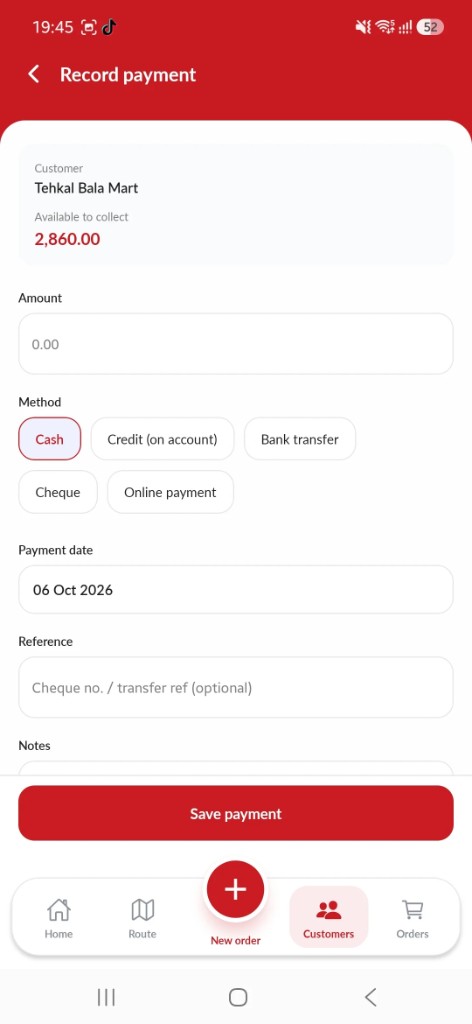
Record cash, bank transfer, or on-account credit at the shop, with an optional photo of the proof. The office verifies it in the dashboard.
See each shop credit limit, available credit, and pay-back days before booking. Orders that would go over the limit can be blocked or flagged.
Available on Android. Download the app and get your team started today.
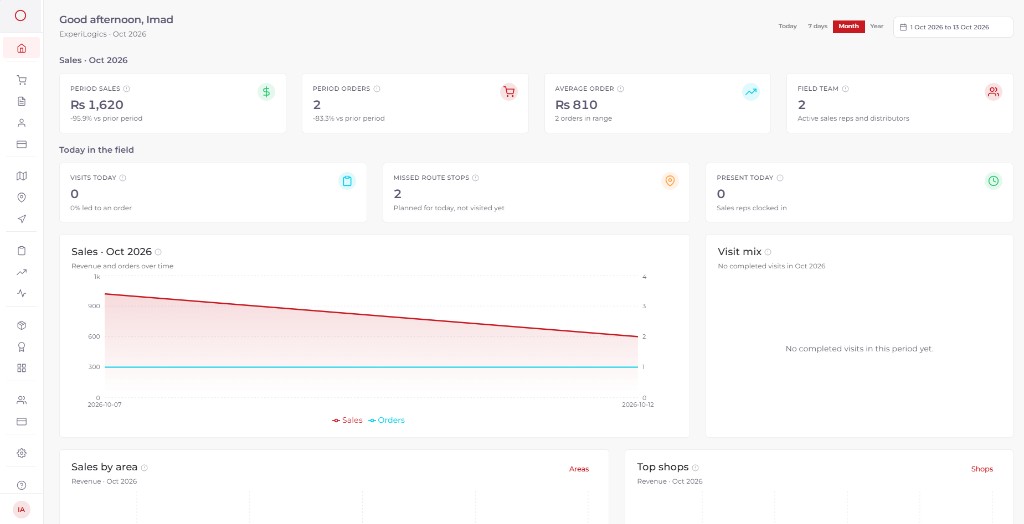
The web admin panel gives sales managers and business owners complete control, from product catalog to team permissions to real-time reports.
See each rep on the map: the day GPS trail, live position, and which visits were planned or unplanned.
View, edit, and update all orders. Update status, print order slips, record payments, and send invoices directly from the dashboard.
Assign daily routes to individual sales reps. Define which shops they visit and in what order, planned every day in advance.
Mark each customer as cash or credit. Credit shops get a spending limit and a pay-back window in days. Orders over the limit can be blocked or allowed with a warning.
Reps record collections in the field. The office verifies them, so the outstanding balance changes only after a payment is confirmed.
Bring in customers, products, brands, categories, territories, and sales areas from a file, so a new company does not start from an empty catalog.
A simple, connected workflow that keeps the whole team aligned, from admin setup to field execution to real-time insight.
Step 01
Import customers, products, and routes, or set them up in the dashboard. Assign territories and plan the day for each sales rep.
Step 02
Opens the app to a personalized greeting, daily targets, and their assigned route already loaded and ready.
Step 03
At each stop, the rep checks in, browses the product catalog, adds items, and places the order, all within the app.
Step 04
Every order placed on the app appears instantly in the admin panel. Managers process, dispatch, or reject in real time.
Step 05
Visit reports, sales totals, route completion, team location, and verified collections all live in the admin dashboard.
Field reps often work where connectivity is unreliable. Order Booker queues orders locally and syncs automatically the moment they're back online. No lost orders, no excuses.
Know what the team is doing right now. See who is at which shop, follow the day on the map, and watch orders and collections come in.
Role-based permissions and a fully configurable product, territory, and route system means Order Booker grows with you, from 5 reps to 500.
Every shop can have a credit limit and a pay-back window. Reps collect in the field, and the office confirms the payment before the balance changes.
Field sales reps work in markets, warehouses, and back alleys where connectivity is unreliable. Order Booker is built offline-first. Orders are queued locally on the device and synced automatically the moment the connection returns. The product catalog and shop list are cached so reps can work through their entire route without a single bar of signal.
Good Morning
Ahmed Khan
Pending Sync
Join businesses who have moved their field sales teams onto a single, connected platform. No complicated setup, no long contracts.
14-day free trial with full features. Choose a plan after you sign in. Contact us if you need help.
Short answers about what Order Booker is, who it is for, which industries it fits, and how it connects to other software.
Order Booker is field sales software for distribution teams. Sales reps book orders, send quotations, and collect payments on an Android app, including offline. Managers track orders, routes, credit, and the team from a web dashboard.
It is built for distribution and FMCG teams whose reps take orders at shops and need the office to see those orders the same day, instead of paper, Excel, or WhatsApp.
Any distribution channel where reps take orders at shops or outlets. That includes FMCG, pharma, food and beverage, personal care, home care, beverages, paints and building materials, electrical goods, auto parts, stationery, and general wholesale or van sales. If your team visits stores and sends orders back to a warehouse or distributor, Order Booker fits.
Yes. The Android app is offline-first. Orders, the product catalog, and shop lists stay on the device and sync automatically when the connection returns.
Reps use the Android app to follow a route, check in, quote, book orders, and collect payments. Managers use the web dashboard to set up the catalog, plan routes, verify payments, and see live sales, visits, and team location.
Yes. You get a 14-day free trial with 1 manager and 1 field rep, with no credit card. After the trial, contact us to upgrade or download your data. Larger teams can book a demo or contact us for a quote.
Yes. We provide integration with third-party systems such as ERP, accounting, and warehouse software, so orders and catalog data can move between Order Booker and the tools you already use. Tell us what you run and we will map the connection.
Create an account on the website, verify your email, and sign in on the web dashboard and the Android app with the same login.
Yes. You can import customers, products, brands, categories, territories, and sales areas from a file, so onboarding does not mean typing the catalog by hand.
Tell us about your sales operation. We'll get back to you within one business day.
We review your message and prepare a tailored walkthrough of Order Booker for your team.
We schedule a 30-minute demo call at a time that works for you.
You get access to a trial account so your team can test it with real data before committing.
[email protected]
Local Support
+92 300 081 2223
International Support
+44 770 015 8830
Location
Karachi, Pakistan